You may have noticed a new message on Konstella when you go to add photos to an album this year. Some students have been flagged as “do not photograph.” This setting was checked when a parent registered their first child at Hacienda, and some of these may have been set by mistake, or the choice may have been intended to keep photos out of outside publications, such as newspapers or social media, while still allowing photos for the yearbook and in-house classroom sharing, which is a separate type of permission.
If your child has been flagged, a room parent will reach out to confirm whether the setting is intentional or accidental. We respect every family’s wishes. However, if a child cannot be photographed, we will need to set that child aside/crop out when taking whole-class pictures for holidays, spirit days, music performances, and other group photos so we don't go against your wishes. If this was not your intention, and you are comfortable with your child appearing in group photos and candids used for the yearbook, you can update your settings yourself in just a few minutes.
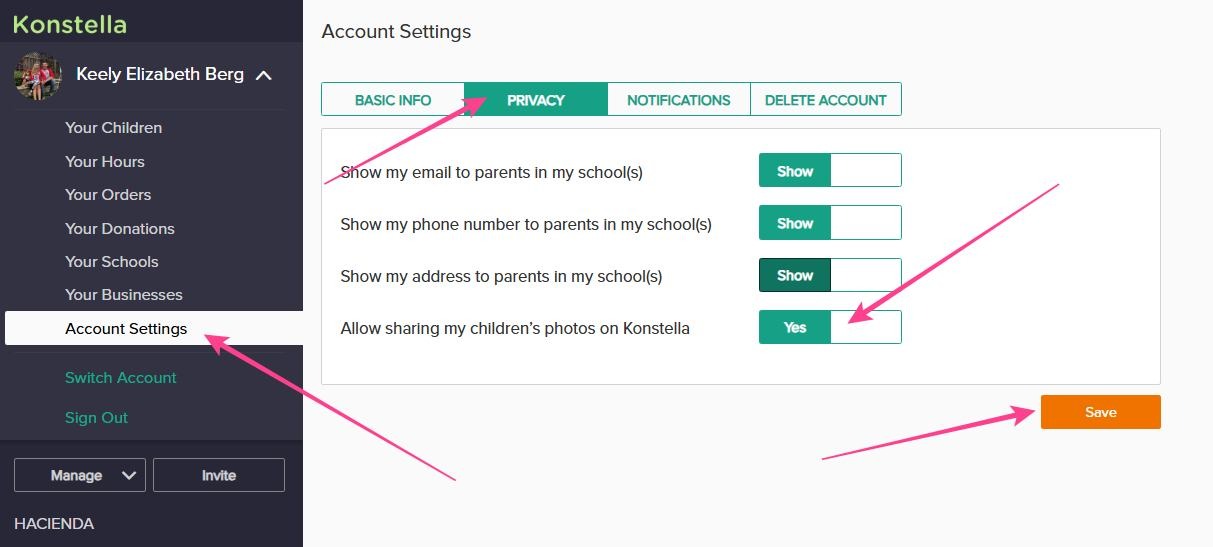
On a web browser:
-
Click your name in the upper left corner of the dashboard.
-
Go to your Settings page
-
Find the Privacy Settings section (second tab over)
-
Look for the photo sharing option, 4th on the list, to share your children’s photos with all school community members. Make sure it says “yes.”
-
Don't forget to hit SAVE!
On the mobile app:
-
Tap the gear (Settings) icon in the upper left corner of the screen.
-
Select your account settings, then find Privacy Settings.
-
Adjust the student photo preference so other parents and staff can upload images featuring your child.
If you have trouble finding any of these options, please reach out to communications@hips.rocks or your room parent, and we will be happy to help. Thank you for your patience and partnership in keeping our yearbook and class memories complete!